Friday, June 25, 2010

Google Maps

What a mash!

Many of the comments on one of the more popular posts (Google Maps in Siebel CRM) on this blog and e-mails I received from readers are around the question:

How can we show multiple addresses in Google Maps?

There are two answers:

First, there is the Google Maps API, which allows you to do (almost) anything you want by using the documented JavaScript functions. However, implementing an embedded map in the Siebel CRM Web Client using the JavaScript API is still a challenge and requires a lot of (browser) scripting. If anyone has gone that far, please let us know.

The second answer - and subject of this post - is of much lower effort (it's scriptless). Of course we can not expect the full glory of interactive maps but maybe the following example holds something for you. At least you'll see how to use Multi-Value Fields with Symbolic URLs.

Besides the JavaScript API, Google has published a URL-based API for static maps. The only thing we have to do is generate a URL similar to the following (line breaks added for better readability):

http://maps.google.com/maps/api/staticmap?
size=650x350&
maptype=roadmap&
markers=Niagara+Falls&
markers=Vienna,Austria&
sensor=false

Click here to see the result of the URL (which is slightly modified from the above to impress you ;-)

The Google server returns a PNG graphic.

The parameters such as size, zoom, maptype and sensor are nicely explained (along with many other options) on the documentation page of the Google Static Maps API. What is of special interest for our requirement of showing multiple account locations is the markersparameter which obviously can be repeated multiple times and produces one marker icon per address.

The markers parameter takes at minimum an address string but can also take other input strings such as the icon graphic, the marker color and a (single character) label text.

How to use the Google Static Maps API with Symbolic URLs

The URL above has been generated by the Siebel Portal Framework. Similar to the well-known example of integrating the dynamic Google maps - which sadly support only a single address - we have to create a Symbolic URL as follows:

URL: http://maps.google.com/maps/api/staticmap
Fixup Name: Default
Multivalue Treatment: Separate Arguments

The Multivalue Treatment parameter is the key to success. When we specify Separate Arguments, then the Portal Framework will repeat the argument for each value of the multi-value field associated with the parameter.

Let's look at the arguments list for the Symbolic String (click to enlarge):
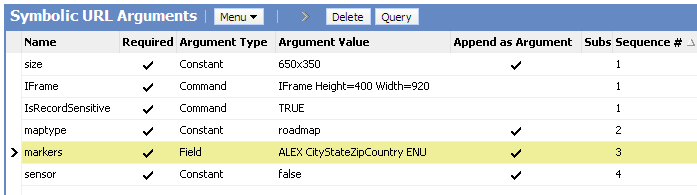
The hot record is the markers argument which takes the name of a (new) multi-value field which concatenates the city, state, zip code and country of an address to a comma-separated string.

The rest of the parameters is similar to our previous example on Google Maps integration. Please refer to this example also for details on how to create the applet etc.

As a result, a static image is returned with one marker for each address of the account.

Summary

With the Google Static Maps API it is possible to embed an image-based Google map in Siebel CRM showing all address locations for the selected account. The Siebel Portal Framework supports the generation of the same URL parameter for each value of a multi-value field, providing a low-effort solution.

Have a nice map

@lex

Saturday, June 19, 2010

Framework

nths (may be an year) back if somebody would have asked me about frameworksand Siebel. Then my answer would have been, “Framework and Siebel are two separate things and don’t go together”.

A comment by “Tiziano and Paolo” changed all that. It started right here, an innocent comment on eScript best practices post published on Siebel unleashed opened the Pandora’s box and introduced us to the world of framework in Siebel. We go to know that a framework called ABS exists and it potentially changes the way we write eScript.

Jason took it to next level by actually confirming the existence of framework and introducing the features of this framework. ABS was bound by IP laws so nothing could be shared technically but it was still an eye opener and a treat to read. Recently Mik picked up the framework baton and started by sharing couple of very useful functions. Then he shared anerror logging framework with some utility function that he he had developed on a T eScript engine. It looked great but sadly, it didn’t work in ST engine.

A discussion about Pro’s and Con’s of various approaches to create framework on Linked In group resulted in opening of more avenues and techniques to lay a foundation of frameworks. Siebel veterans Matt and Andres discussed alternates to method chaining and prototyping and various techniques they had used to create there frameworks.

Finally Matt has given us a full fledged framework working on ST Engine (should work on T with few minor modifications). His framework helps in reducing the amount of code you have to write in Application. Just to show an example:

  • Run a business service:
ar bIsValid = oFramework .Service.run("PTSB VCA System Process Service.ValidatePpsn", ["Ppsn"], ["4576554F"]).IsValid

Query a Business Component:

var sFullName = oFramework.BusComp.getRecord("Employee.Employee", TheApplication().LoginId(), ["Full Name"])["Full Name"];

I am going to give it a try very soon and will share my experience. The big question is what other benefits does it have apart from code reduction?? Does it help in improve performance and memory utilization??

Only time will tell…

Related Posts

Tuesday, May 18, 2010

EAI Siebel Adapter - Handling Each Record as a Transction

The EAI Siebel Adapter business service is probably the most important (and most widely adopted) EAI business service. It is well documented and most of the EAI professionals know how to handle it.

One thing you come across early is how EAI Siebel Adapter handles the input SiebelMessage objects. Let's consider an example with a SiebelMessage which includes 10 accounts. If we execute for example the upsert method and account number 8 has an invalid value in the status field (picklist errror) then no record is inserted or updated at all.

In other terms, a SiebelMessage is considered a "transaction" and EAI Siebel Adapter "rolls back" all changes made to records when some error occurs during processing of the SiebelMessage.

Sometimes this behaviour is not desirable. For example, you want to send in a batch of updates to Siebel and just want to be notified which records where processed and which not.

The ObjectLevelTransactions input argument is the solution to that problem. If we set it to "True" (and do the same with the StatusObject parameter), EAI Siebel Adapter will treat each single object in the SiebelMessage as a transaction.

It will also return the status object which we can parse in order to find out whether there were any problematic records. They will have an accompanying ErrorMessage property with the error message received during the operation.

Have a nice day

Friday, May 7, 2010

Gateway Server - Audit Trail

When I discuss Siebel Audit Trail in my classes, a frequent question is: "Does it work with the server configuration views?".

I answer this question as follows:

You can try to add the (virtual) business components to the Audit Trail Administration but you would be disappointed with the result. But there's some hope: The built-in Audit Trail for the Siebel Gateway Name Server (and it has nothing to do with the "real" Audit Trail).

This feature is officially documented in the Siebel 8.1 bookshelf and really straightforward. So here is an abstract.

In the gateway.cfg file's [InfraNameServer] section, set the EnableAuditTrail parameter to True (should be default anyway).

With this setting, "most (so says bookshelf) logins, modifications, writes and deletions are logged" to a file named nameserver_audit.log which by its nature resides in the log subdirectory of the Siebel Gateway Name Server installation folder.

This means that we are able to capture all login attempts to the Siebel Gateway Name Server. This could be from the srvrmgr command line utility or from the server admin screens in the Siebel client.

In addition, each modification to the enterprise configuration such as changing parameter settings are logged.

Let's have a look at the file:

It's a tab separated text file with the following columns:
  • Timestamp for the audit entry
  • Record Type such as "Clientconnect" or "WriteRecord"
  • Host name
  • Process Id
  • Client name such as srvrmgr, siebsess or siebmtsh
  • User name
  • Key name (the entry in siebns.dat which has been modified during a WriteRecord event)
  • Value (the new value of the key)
have a nice day

@lex

Wednesday, May 5, 2010

Bookshelf

Recently, I received e-mails and comments from two great contributors to the Siebel CRM community. Coincidentally, both the e-mail from Vladimir from Slovakia and Lennart's comment were about using Google to search the online version of the Siebel Bookshelf.

Vladimir used Google's custom search feature to create the following search engines:


He recommends to integrate the custom search engines into your browser.

These links are also available on the Siebel Bookshelf Page of this blog.
Many thanks, Vladimir!

Lennart described in his comment (which was not published because I decided to create this post, thanks for your patience, Lennart) how to create a simple Siebel Bookshelf search widget to use on any web page.

I have taken the freedom to make the code available for download here.

NamedMethod

Named Method n (Business Component)


This user property allows you to invoke a business component or business service method, or set a field value. It can be used in place of scripting.


Value

The value you provide for the Named Method user property depends on the action you want to perform.

For setting a field value, the value consists of three quoted parameters separated by a comma and a space, as follows:

"Name", "SET", "Field", "Expression"

When Name is called, the value of Field is set using Expression.

For invoking a business component method, the value consists of four quoted parameters separated by a comma and a space, as follows:

"Name", "Action", "BusComp", "Method"

When Name is called, Method is invoked on the BusComp business component based on the defined Action. For a list of actions, see Table 21.

For invoking a business service method, the value consists of five quoted parameters separated by a comma and a space, as follows:

"Name", "Action", "BusComp", "Service", "Method"

When Name is called, Method from the Service business service is invoked on the BusComp business component based on the defined Action. For a list of actions, see Table 21.

You can optionally append an additional parameter that defines an expression. If you use a business service action, the expression is passed as a property set, so you must use name-value pairs rather than an array of strings ("NameExpr", "ValueExpr").

Usage

Sometimes it is necessary to trigger actions in response to data changes, for example when records are created, deleted, or updated. The response can be required to be triggered before or after the date change has been applied.

Within the Siebel Application there is standard functionality, including user properties, to allow you to implement automated responses to data changes without the need to use custom scripts.

The Named Method n user property can be used to invoke methods in a certain order.

For an example of its use, see Named Method n (Applet).

This user property is supported for business components based on the CSSBCBase class.

You can create additional instances of this user property as needed. If you have more than one instance of this user property for a business component, each instance is executed sequentially by number (for example, Named Method 1, then Named Method 2, and so on). If there is only one such user property, then no number is required.

See also About Setting Numbered Instances of a User Property.

Parent Object Type

Business Component

Functional Area

CSSBCBase

Table 21 lists the actions available for the Named Method n user property.

Table 21. Action Values for Named Method n
Action
Method Type
Functional Implication

INVOKE

Business component

Invokes the method

INVOKESEL

Business component

Saves the state and invokes the method once for each selected record

INVOKEALL

Business component

Saves the state, requeries, and invokes the method once for each record

INVOKESAVE

Business component

Saves the state, requeries, and invokes the method

INVOKESVC

Business service

Invokes the method

INVOKESVCSEL

Business service

Saves the state and invokes the method once for each selected record

INVOKESVCALL

Business service

Saves the state, requeries, and invokes the method once for each record

INVOKESVCSAVE

Business service

Saves the state, requeries, and invokes the method

PreCan Invoke

So what does the committed Siebel developer do when it comes to create a button on a Siebel applet?

Of course, you'd start with adding a MiniButton control to the applet layout and specify the method to be invoked in the MethodInvoked property.

Such a button is visible on the applet but not clickable. The reason is that the Siebel framework does not "know" the custom method and the Siebel CanInvokeMethod event handler only enables "known" methods.

Most developers head for the applet script editor and add a server script similar to the following in the PreCanInvokeMethod event handler to enable the button.


The result is that the button is active and clickable, so we can now focus on implementing the desired functionality such as invoking a business service.

BUT: Very often, the script is repeated across dozens or hundreds of applets without any further logic, for example switching the button state depending on user or data attributes. The script just has to "be there" in order to make 'em damn buttons active. So we end up with a lot of script.

Or is there...?

Yes, there are various alternatives which I will discuss in this post.

Named Method User Property

If you wish to have a button which is always active and invokes a method or business service (or Siebel workflow process via the Workflow Process Manager business service), you simply declare the Named Method user property.

Even if you could do it on the applet, why not just do it on the business component? Usually the method should be enabled on all applets on a given BC, shouldn't it?

The syntax for business component side Named Method entries is as follows:

Name: Named Method N (where N is a sequential number)
Value: "MethodName", "INVOKE Command", "INVOKE Arguments"

Here is an example:


There are numerous examples in the Siebel Repository, so we can most probably copy an existing Named Method user prop and modify the sequence number and the value.

More information about the Named Method business component user property and the various "INVOKE" commands can be found in the Siebel Developer's Reference.

Once the Named Method user property is set at either the applet or BC level, the buttons (or Command objects) referencing the method are in an active state. There is NO SCRIPT NEEDED. This technique works at least since Siebel 2000.

CanInvokeMethod Applet User Property

In Siebel 8.0, a new applet user property named CanInvokeMethod has been introduced which is documented here. The benefit of this user property is that its value can be an expression (in Siebel Query Language) which returns TRUE or FALSE. So simple decision logic when to enable or disable a method can be implemented without scripting.

FrameEventMethod prefix

Originating in the "Synthetic Event Button" feature in interactive workflow processes in Siebel 7.7, the quite exotic "FrameEventMethod prefix" allows us to create a button which invokes a method and have it always enabled without the need for script or even user properties.


Using the string "FrameEventMethod" as a prefix for the name of the method to be invoked ensures that the Siebel event framework accepts the method, so it can be easily used in a workflow process event or similar. Don't believe it? Try it!

Summary

The truth about (script in) the PreCanInvokeMethod event handler?
It is rarely ever needed. There are various declarative alternatives which we can use in our everlasting effort to reduce the use of scripting while customizing Siebel CRM.

have a nice day