Monday, July 5, 2010

Query and QueryBiDirectional


This might be a very trivial and known thing for people working in Siebel 8.0 workflowsfrom long time. But I wasted around couple of hours for nothing over this. So, thought of posting it here which might help newbie’s save some time if they happen to stumble over same problem.This post is about Siebel Operation step in Siebel 8.0 workflows.

Everybody knows that Siebel Operation step has been armed with new methods such as Next Record, Previous Record, Upsert etc to make our life easier.

Requirement:

The requirement on which I was working required me to:

  • Query Service Request Attachment records related to a Service Request
  • Run a loop around it
  • Perform some operation in a business service on those records.

So, I created a workflow use Query, Next Record operation to loop through records and had a business service step in which output from query operation was passed and some manipulations were done. Basically

Query SR -> Query SR Attachment -> Run BS -> Next Record -> Query SR Attachment

Problem:

Problem started when the requirement was modified, to update the record after calling the business service. I added an update step in between BS step and Next Record step and workflow stopped looping on records.

Query SR -> Query SR Attachment -> Run BS -> Update Record -> Next Record -> Query SR Attachment

It would exit only after updating the first record.

Solution:

After struggling for around couple of hours (in which I almost created the workflow again) I noticed that there is another method in addition to Query Method “QueryBiDirectional”. Instead of Query operation I used QueryBiDirectional and the problem was solved.

Reason:

Searching bookshelf for this method I found the following line

“If the workflow is traversing active records or if your workflow uses the PreviousRecord operation, query bidirectionally. Otherwise, use the standard Siebel query operation.”

I was neither traversing Active Records nor I was using Previous Records but still I had to use QueryBiDirectional to make my workflow work. I am not sure why this happens but the moral of the post is

Use QueryBiDirectional instead of Query whenever you are going to have an update operation in between Query and Next Record.

If anybody knows, why this happens please do share with us!

Thursday, July 1, 2010

Quick Fill - Requirement

One of the lesser known features of Siebel CRM (it came with version 7.7) is Quick Fill. It manifests itself in many of the standard form applets such as the Service Request Detail Applet.

When you open the applet menu, you can see the typical group of four commands.

With the Save as Template command we can save the current record as a Quick Fill Template. These templates are private by default (just as predefined queries are) and can be made public by anyone who has access to the Quick Fill Templates Administration View in the Administration - Application screen.

When an end user chooses the New From Template command, a pick applet opens and displays all available templates. The end users selects one and the data from the template is inserted in a new record. The Apply Template command works in a similar way but updates the existing record instead of creating a new one.

Power users can leverage the CTRL+J keyboard shortcut (New From Last Template) which creates a new record with data from the last used template.

So you want this on your form applet?

It is as simple as creating four new Applet Method Menu Items as described here.

However, I would recommend to use the Compare Objects window to simply copy them over from, say, the Service Request Detail Applet.


It comes rather unexpected, but this is it. Simply copy over the four menu items and compile the applet.

Quick Fill under the hood

When a template is saved, the data is taken from the form applet and copied to the template. This includes all non-empty single value fields. The HTML Sequence property of the applet's controls (aka tab order) specifies the sequence in which the data will be applied to a new or existing record.

We can prevent the copy effect for individual fields which will be different for each record (such as Account etc.) by using the BusComp User Property "Quick Fill Excluded Field: FieldName" on the applet's business component. A field name must be provided after the colon and the value should be set to Y.

Have a nice day

@lex

Friday, June 25, 2010

Google Maps

What a mash!

Many of the comments on one of the more popular posts (Google Maps in Siebel CRM) on this blog and e-mails I received from readers are around the question:

How can we show multiple addresses in Google Maps?

There are two answers:

First, there is the Google Maps API, which allows you to do (almost) anything you want by using the documented JavaScript functions. However, implementing an embedded map in the Siebel CRM Web Client using the JavaScript API is still a challenge and requires a lot of (browser) scripting. If anyone has gone that far, please let us know.

The second answer - and subject of this post - is of much lower effort (it's scriptless). Of course we can not expect the full glory of interactive maps but maybe the following example holds something for you. At least you'll see how to use Multi-Value Fields with Symbolic URLs.

Besides the JavaScript API, Google has published a URL-based API for static maps. The only thing we have to do is generate a URL similar to the following (line breaks added for better readability):

http://maps.google.com/maps/api/staticmap?
size=650x350&
maptype=roadmap&
markers=Niagara+Falls&
markers=Vienna,Austria&
sensor=false

Click here to see the result of the URL (which is slightly modified from the above to impress you ;-)

The Google server returns a PNG graphic.

The parameters such as size, zoom, maptype and sensor are nicely explained (along with many other options) on the documentation page of the Google Static Maps API. What is of special interest for our requirement of showing multiple account locations is the markersparameter which obviously can be repeated multiple times and produces one marker icon per address.

The markers parameter takes at minimum an address string but can also take other input strings such as the icon graphic, the marker color and a (single character) label text.

How to use the Google Static Maps API with Symbolic URLs

The URL above has been generated by the Siebel Portal Framework. Similar to the well-known example of integrating the dynamic Google maps - which sadly support only a single address - we have to create a Symbolic URL as follows:

URL: http://maps.google.com/maps/api/staticmap
Fixup Name: Default
Multivalue Treatment: Separate Arguments

The Multivalue Treatment parameter is the key to success. When we specify Separate Arguments, then the Portal Framework will repeat the argument for each value of the multi-value field associated with the parameter.

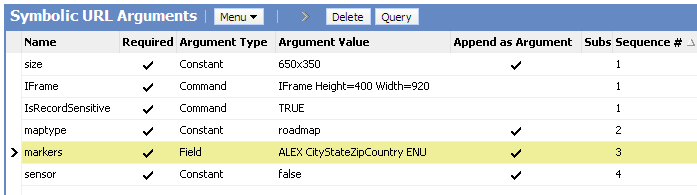
Let's look at the arguments list for the Symbolic String (click to enlarge):

The hot record is the markers argument which takes the name of a (new) multi-value field which concatenates the city, state, zip code and country of an address to a comma-separated string.

The rest of the parameters is similar to our previous example on Google Maps integration. Please refer to this example also for details on how to create the applet etc.

As a result, a static image is returned with one marker for each address of the account.

Summary

With the Google Static Maps API it is possible to embed an image-based Google map in Siebel CRM showing all address locations for the selected account. The Siebel Portal Framework supports the generation of the same URL parameter for each value of a multi-value field, providing a low-effort solution.

Have a nice map

@lex

Saturday, June 19, 2010

Framework

nths (may be an year) back if somebody would have asked me about frameworksand Siebel. Then my answer would have been, “Framework and Siebel are two separate things and don’t go together”.

A comment by “Tiziano and Paolo” changed all that. It started right here, an innocent comment on eScript best practices post published on Siebel unleashed opened the Pandora’s box and introduced us to the world of framework in Siebel. We go to know that a framework called ABS exists and it potentially changes the way we write eScript.

Jason took it to next level by actually confirming the existence of framework and introducing the features of this framework. ABS was bound by IP laws so nothing could be shared technically but it was still an eye opener and a treat to read. Recently Mik picked up the framework baton and started by sharing couple of very useful functions. Then he shared anerror logging framework with some utility function that he he had developed on a T eScript engine. It looked great but sadly, it didn’t work in ST engine.

A discussion about Pro’s and Con’s of various approaches to create framework on Linked In group resulted in opening of more avenues and techniques to lay a foundation of frameworks. Siebel veterans Matt and Andres discussed alternates to method chaining and prototyping and various techniques they had used to create there frameworks.

Finally Matt has given us a full fledged framework working on ST Engine (should work on T with few minor modifications). His framework helps in reducing the amount of code you have to write in Application. Just to show an example:

  • Run a business service:
ar bIsValid = oFramework .Service.run("PTSB VCA System Process Service.ValidatePpsn", ["Ppsn"], ["4576554F"]).IsValid

Query a Business Component:

var sFullName = oFramework.BusComp.getRecord("Employee.Employee", TheApplication().LoginId(), ["Full Name"])["Full Name"];

I am going to give it a try very soon and will share my experience. The big question is what other benefits does it have apart from code reduction?? Does it help in improve performance and memory utilization??

Only time will tell…

Related Posts

Tuesday, May 18, 2010

EAI Siebel Adapter - Handling Each Record as a Transction

The EAI Siebel Adapter business service is probably the most important (and most widely adopted) EAI business service. It is well documented and most of the EAI professionals know how to handle it.

One thing you come across early is how EAI Siebel Adapter handles the input SiebelMessage objects. Let's consider an example with a SiebelMessage which includes 10 accounts. If we execute for example the upsert method and account number 8 has an invalid value in the status field (picklist errror) then no record is inserted or updated at all.

In other terms, a SiebelMessage is considered a "transaction" and EAI Siebel Adapter "rolls back" all changes made to records when some error occurs during processing of the SiebelMessage.

Sometimes this behaviour is not desirable. For example, you want to send in a batch of updates to Siebel and just want to be notified which records where processed and which not.

The ObjectLevelTransactions input argument is the solution to that problem. If we set it to "True" (and do the same with the StatusObject parameter), EAI Siebel Adapter will treat each single object in the SiebelMessage as a transaction.

It will also return the status object which we can parse in order to find out whether there were any problematic records. They will have an accompanying ErrorMessage property with the error message received during the operation.

Have a nice day

Friday, May 7, 2010

Gateway Server - Audit Trail

When I discuss Siebel Audit Trail in my classes, a frequent question is: "Does it work with the server configuration views?".

I answer this question as follows:

You can try to add the (virtual) business components to the Audit Trail Administration but you would be disappointed with the result. But there's some hope: The built-in Audit Trail for the Siebel Gateway Name Server (and it has nothing to do with the "real" Audit Trail).

This feature is officially documented in the Siebel 8.1 bookshelf and really straightforward. So here is an abstract.

In the gateway.cfg file's [InfraNameServer] section, set the EnableAuditTrail parameter to True (should be default anyway).

With this setting, "most (so says bookshelf) logins, modifications, writes and deletions are logged" to a file named nameserver_audit.log which by its nature resides in the log subdirectory of the Siebel Gateway Name Server installation folder.

This means that we are able to capture all login attempts to the Siebel Gateway Name Server. This could be from the srvrmgr command line utility or from the server admin screens in the Siebel client.

In addition, each modification to the enterprise configuration such as changing parameter settings are logged.

Let's have a look at the file:

It's a tab separated text file with the following columns:
  • Timestamp for the audit entry
  • Record Type such as "Clientconnect" or "WriteRecord"
  • Host name
  • Process Id
  • Client name such as srvrmgr, siebsess or siebmtsh
  • User name
  • Key name (the entry in siebns.dat which has been modified during a WriteRecord event)
  • Value (the new value of the key)
have a nice day

@lex

Wednesday, May 5, 2010

Bookshelf

Recently, I received e-mails and comments from two great contributors to the Siebel CRM community. Coincidentally, both the e-mail from Vladimir from Slovakia and Lennart's comment were about using Google to search the online version of the Siebel Bookshelf.

Vladimir used Google's custom search feature to create the following search engines:


He recommends to integrate the custom search engines into your browser.

These links are also available on the Siebel Bookshelf Page of this blog.
Many thanks, Vladimir!

Lennart described in his comment (which was not published because I decided to create this post, thanks for your patience, Lennart) how to create a simple Siebel Bookshelf search widget to use on any web page.

I have taken the freedom to make the code available for download here.